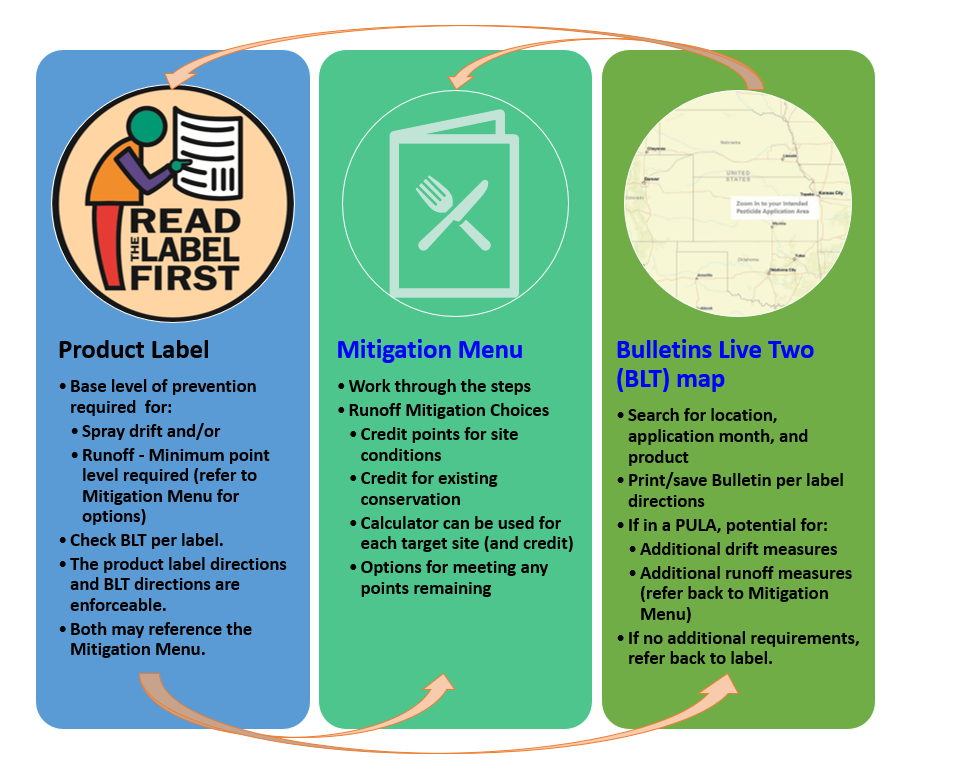
Pesticide product labels will begin having new language for endangered species protections as new active ingredients are registered and as existing products are re-registered. There are two major things to look for on the label:
- There will be a statement requiring the user to access the Bulletins Live! Two web map to search for a combination of their application site location(s), product registration number, and month of application. This must be done within 6 months prior to the application. Follow the directions shown on the left side of that page. Multiple products can be selected by typing or pasting the registration number, then selecting the product from the choices that pop up. Move and zoom the map as needed so that your application area takes up most of the screen. When the “Printable Bulletin” button is green, you should print or save the bulletin as documentation, even if there are no restrictions for your product at your application site. If there are restrictions listed for your product/site/month of application, follow those directions for drift reduction and/or runoff/erosion reduction. The Bulletin may direct you to access the Mitigation Menu for how to calculate mitigation points for runoff/erosion reduction credit. One must follow whichever restrictions require the most points - either those on the Bulletin or those on the label. The Mitigation Menu is explained below.
- There may be drift reduction and runoff/erosion reduction language on the label for application sites near “habitat.” Runoff/erosion reduction mitigation will need to meet a set number of points. There are options for meeting those points in the Mitigation Menu. One should walk through the steps of the Mitigation Menu. Using any of the mitigation tools available (the Migration Calculator spreadsheet, the printable Mitigation Worksheet, or the Pesticide App for Label Mitigation (PALM)). Using these tools not only serves as documentation of compliance, but it counts as “mitigation tracking” which also can receive credit for meeting the points required.
Drift reduction measures may be listed directly on the label. If so, it will list options for reducing the width of the buffer that serves as the starting point. The measures will each have a percent reduction which can be added to other mitigation measures. Similar to the runoff measure portion of the label, users are encouraged to use any of the tools to help you calculate and document your mitigations for each application.
NDA held a series of informational meetings for helping Nebraska applicators become familiar and understand this new EPA effort. A Q&A document, slide presentations, meeting recordings, and handouts are available online.
Helpful Links
- EPA Mitigation Menu (including the Mitigation Calculator, printable worksheets, and PALM web app)
- Bulletin's Live! Two Map (EPA)
- One-page BLT Guide (EPA)
- ESA Pesticide User Guide and Flowchart (CropLife America)
- Nebraska's Rare Species - Includes range maps, life history, and habitat descriptions (Nebraska Game and Parks)
Related Links
- Endangered Species Act
- Nebraska Game and Parks Commission
- Tern and Plover Conservation Partnership
- University of Nebraska-Lincoln, Pesticide Education Resources
- U.S. Fish & Wildlife Service Endangered Species Program
- CropWatch: Endangered Species Act in Nebraska: Crop Protection Program Requirements, Part 1
- CropWatch: Endangered Species Act in Nebraska: Runoff and Erosion Mitigation, Part 2
- CropWatch: Endangered Species Act: Ecological Spray Drift Buffers, Part 3
More Information